
Yardım MerkeziOrganizasyonu Yönetme
Bu makale henüz Türkçeye çevrilmedi. Aşağıda İngilizce sürümünü okuyabilirsiniz.
Permission reference
Every permission in the Roles matrix, module by module, and what each one lets a person do.
This is the full list of permissions you can tick for a role, in the order and wording the Permissions window under Settings > Roles shows them. Use it when you build a role and want to know exactly what one tick hands over. For how roles work and how to edit one, see Roles and permissions.
Before you start
- You need Administration: Manage to change a role's permissions.
- Each permission is written here as Module: Action, the way the matrix groups them: the module is the heading, the action is the checkbox.
- Settings > Permissions lists the same permissions read only, each under its readable name with a short description. The small code beneath the name, such as
fuel.manage, is only for quoting to support.
How to read this page
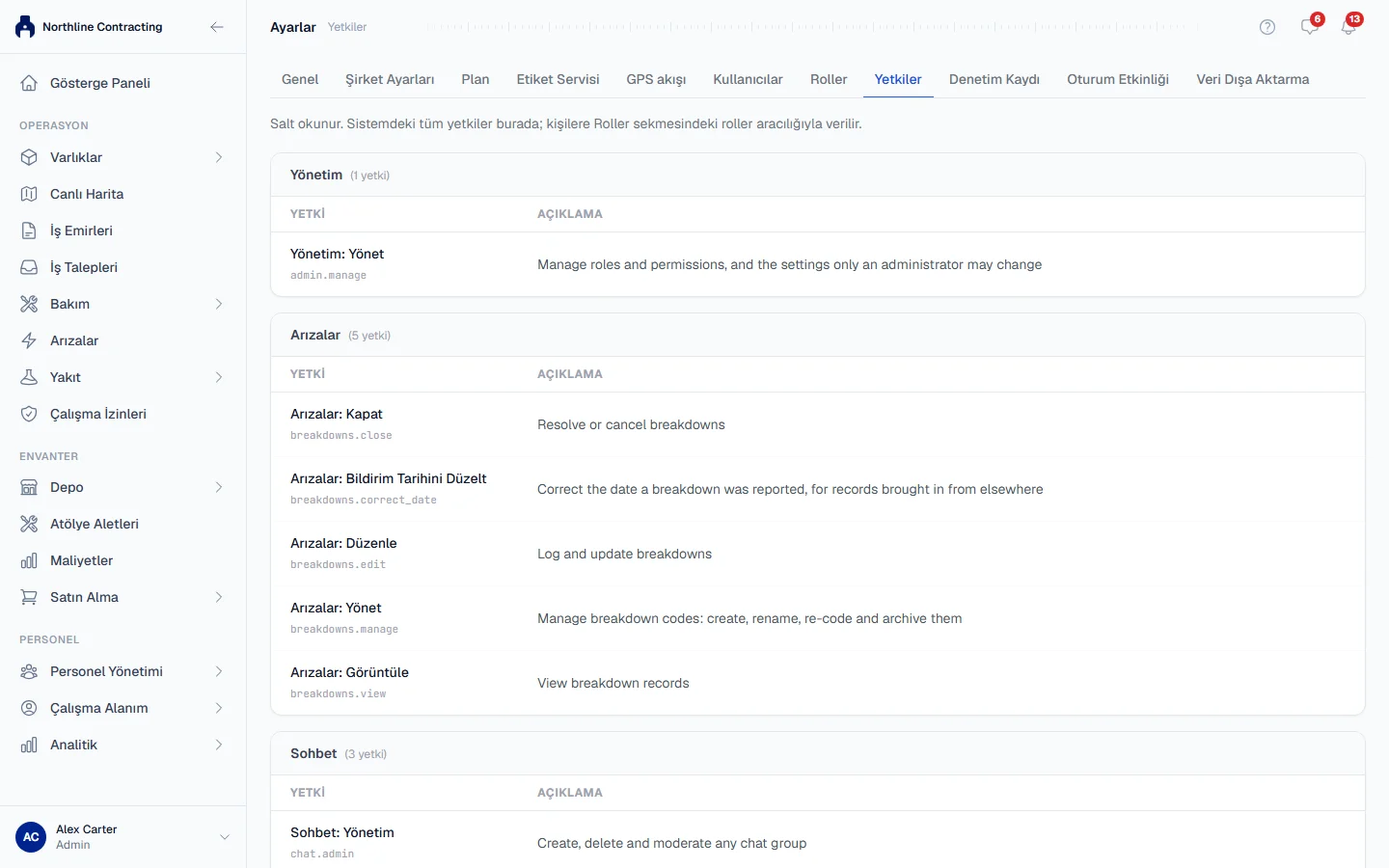
Most modules have View (see the module and its records) and Edit (create and change records). An action with its own checkbox is a riskier step you may want to give to fewer people. Three things limit a permission whatever the role says:
- The plan. A module your plan does not include shows a lock. See Plans, the free trial and seats.
- The seat. A work requester can only use a short list of entry permissions, whatever their role holds. See Disable, re-enable and seats.
- Granting. You cannot give someone a role that carries a permission you do not hold yourself, unless you hold Administration: Manage.
Assets and places
| Permission | What it allows |
|---|---|
| Equipment: View | Open the Equipment Register and each machine's page. |
| Equipment: Edit | Add and edit machines, change status, record readings, upload a machine's documents and photos, mount attachments. |
| Equipment: Export | Download the register to Excel. |
| Equipment: Delete | Delete a machine registered by mistake, only while it has no records. |
| Equipment: Dispose | Record a machine as sold, scrapped or written off, and reinstate it. |
| Locations: View / Edit | See, add and edit Locations. |
| Sublocations: View / Edit | See, add and edit Sublocations. |
| Live Map: View | Open Live Map, its layers, replay and a machine's day track. Machine details also need Equipment: View. |
| Live Map: Edit | Create or import a site plan and draw Sublocations on it. |
| Labels: View | See label templates and the print history. |
| Labels: Print | Print QR labels. |
Maintenance
| Permission | What it allows |
|---|---|
| Work Orders: View | See work orders. |
| Work Orders: Edit | Create, edit and assign work orders. |
| Work Orders: Close | Start and close work orders. |
| Work Orders: Execute | Fill in the Work done section and sign it. |
| Work Orders: Manage | Choose your company's sign-off roles. See Configure sign-off roles. |
| Work Requests: View | See work requests. Without Triage, only your own. |
| Work Requests: Edit | Raise a work request from inside the app. |
| Work Requests: Triage | Turn a request into a work order or breakdown, or close it with a reason. |
| Breakdowns: View / Edit | See, report and update breakdowns. |
| Breakdowns: Close | Resolve or cancel a breakdown. |
| Breakdowns: Correct Report Date | Correct the day a breakdown was reported, with a reason. |
| Breakdowns: Manage | Define your breakdown codes. |
| Preventive Maintenance: View | See PM status, history and templates. |
| Preventive Maintenance: Edit | Log, correct and withdraw completed services. |
| Preventive Maintenance: Assign | Put a PM template on a machine. |
| Preventive Maintenance: Edit Imported Last PM | Edit the last service a machine was imported with. |
| Routine Maintenance: View / Edit | See and record daily maintenance jobs, and withdraw your own entries. |
| Routine Maintenance: Manage | Edit the job list and maintenance teams, and withdraw anyone's entry. |
| Maintenance Planning: View / Schedule | See the planning queue and schedule work in it. |
| Inspections: View / Edit | See inspections, carry them out and record findings. |
| Inspections: Close | Resolve findings. |
| Inspections: Templates | Build inspection templates and finding categories. |
| Work Permits: View / Edit | See and raise work permits. |
| Work Permits: Approve | Approve or reject a permit. |
| Work Permits: Sign | Sign a permit and make it active. |
| Work Permits: Close | Close or cancel a permit. |
| Work Permits: Templates | Manage permit templates. |
Fuel, stock and money
| Permission | What it allows |
|---|---|
| Fuel: View / Edit | See fuel records and log fill-ups. |
| Fuel: Export | Export fuel data and print the fuel report. |
| Fuel: Manage | Edit or void any fill-up at any time, and run fuel stations and fuel settings. |
| Warehouse: View / Edit | See stock, and receive and issue parts. |
| Warehouse: Export | Export warehouse data. |
| Warehouse: Manage | Adjust stock counts, set up storage places and part classification. |
| Tools: View / Edit | See and edit the tool register. |
| Tools: Assign | Hand tools out and record returns. |
| Tools: Administration | Manage tool categories and retire tools. |
| Procurement: View | Open Procurement and see purchase requests, purchase orders and their approvals. Approving a purchase request needs nothing more: being the next approver is enough. |
| Procurement: Edit | Raise purchase requests. |
| Procurement: Manage | Set up the approval chain. |
| Procurement: Order | Raise and issue purchase orders and keep the supplier list. |
| Procurement: Approve | Approve a purchase order raised by somebody else. |
| Procurement: Receive | Record a delivery against a purchase order. |
| Costs: View / Edit / Export | See costs, add manual entries and void them, and export. |
People
| Permission | What it allows |
|---|---|
| Employees: View | See the employee list, profiles, documents, certifications and the organisation chart. |
| Employees: Edit | Add and edit employees and their documents, and keep departments, subdivisions, teams and positions. |
| Employees: Export | Export the employee list. |
| Timesheets: View / Edit | See and record daily attendance for everyone. |
| Leave: View | See leave records and balances. |
| Leave: Edit | Log leave for employees, set entitlements and keep leave types. |
| Leave: Approve | Approve or reject leave requests, never your own. |
| Leave: Request | Submit your own leave requests from My Workspace. |
| Chat: Administration | Create, own and moderate any chat group. |
| Chat: Department Admin | Create and moderate groups for your own department. |
| Chat: Team Admin | Create and moderate groups for your own team. |
Reporting and administration
| Permission | What it allows |
|---|---|
| Analytics: View / Export | Open the analytics reports and export them. |
| Analytics: Schedule | Set up automatic reports that are emailed on a schedule. |
| Data Export: Run | Run and download a data export. Each category also needs that module's own View (and Export where it has one). |
| Data Export: Schedule | Set up scheduled data exports. |
| Settings: View / Edit | See and change Company Settings, the Plan tab and the GPS feed keys. |
| Users: View / Edit | See users; add and edit them, reset passwords and send invitations. |
| Users: Delete | Disable and re-enable accounts. |
| Administration: Manage | Roles and permissions, the Audit Log and Session Activity. |
Troubleshooting
| What you see | What to do |
|---|---|
| "You cannot assign a role that grants permissions you do not hold" | Ask someone with Administration: Manage to assign it, or hold those permissions yourself first. |
| A module shows a lock | Your plan does not include it. See Plans, the free trial and seats. |
| A user has the permission but cannot use it | They may be on a work requester seat. See Disable, re-enable and seats. |