
Correct a meter reading
Fix a mistyped figure on the latest reading of a meter, with a reason that is kept in the audit log.
Meters get mistyped: 124500 instead of 12450 is the usual one. Correct changes the value of the latest reading on a meter and keeps a record of what it was, who changed it and why.
Before you start
- You need the Equipment: Edit permission.
- Only the latest reading on each meter can be corrected. The Correct button appears on that row only.
Correct the latest reading
- Open the machine and go to the Meter Readings tab.
- If the machine has both meters, choose Hourmeter or Odometer.
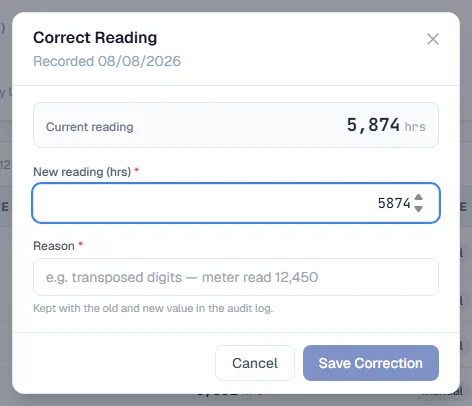
- On the top row of the history, click Correct. The Correct Reading dialog opens, showing when the reading was recorded and by whom, and its Current reading.
- Type the right figure in New reading.
- Type a Reason, such as "transposed digits, meter read 12,450". It must be at least three characters.
- Click Save Correction.
A message confirms the new figure, and the reading now carries a corrected badge. The machine's current reading and SMR are updated, downwards as well as upwards.
What a correction changes, and what it does not
- It changes the value only. The reading's date and time stay as they were. A correction fixes a wrong number, not a wrong moment.
- It is checked like a new reading. The corrected figure cannot be below the reading before it, or below the machine's opening figure when it is the only reading. A large jump is saved with a warning message instead of being refused.
- It is audited. The old value, the new value, your reason, your name and the time are kept in the audit log under their own action, so a correction can always be told apart from an ordinary edit.
A reading that came from somewhere else
A reading taken at a fuel fill is corrected here, like any other. The fuel entry itself is not changed.
A reading written by a logged PM service is linked to that service: correcting either one updates the other. See Correct or withdraw a PM.
Troubleshooting
| What you see | What to do |
|---|---|
| No Correct button on the reading you want | It is not the latest reading on that meter. Only the newest one can be corrected. |
| "Only the most recent reading on a meter can be corrected. A newer reading has been recorded since this one." | Someone added a reading after you opened the page. Reload the tab and correct the latest one. |
| Save Correction stays greyed out | Enter a figure different from the current one, and a reason of at least three characters. |
| A message saying the figure is below the last recorded reading | The corrected figure must still be at least the reading before it. |
| "Could not save the correction." | Check your connection and try again. |