
Equipment statuses
What each equipment status means, how to change a machine's status, and the two statuses Solmex sets for you.
A machine's status says whether it is available for work, out of service, or no longer on your site. It drives the counts on the Equipment Register, the dashboard and the reports, so keeping it right keeps those figures right.
Before you start
- You need Equipment: Edit to change a machine's status.
- Open the machine's page. The status button is at the top right. See The equipment page.
The statuses
| Status | Set by | Typical use |
|---|---|---|
| Active | You | Working, or ready to work. |
| Standby | You | Available, but not in use. |
| Maintenance | You | Out of service for planned work. |
| Mobilizing | You | Arriving on site, not yet working. |
| Transferred | You | Moved away to another site. |
| Demobilized | You | Taken off site. |
| Off-Hire | You | A rented machine whose hire has ended. |
| Breakdown | Solmex | Set automatically while the machine has an open breakdown. |
| Disposed | Solmex | Set only through Dispose of…, for a machine you no longer have. |
Transferred, Demobilized and Off-Hire count as off site: they are not part of your working site, so they are left out of the availability figures and the daily meter round.
Change a machine's status
- On the machine's page, click the status button at the top right. The Change status menu opens, with a tick beside the current status. You need Equipment: Edit: without it the status is shown as a plain badge and cannot be clicked.
- Click the new status.
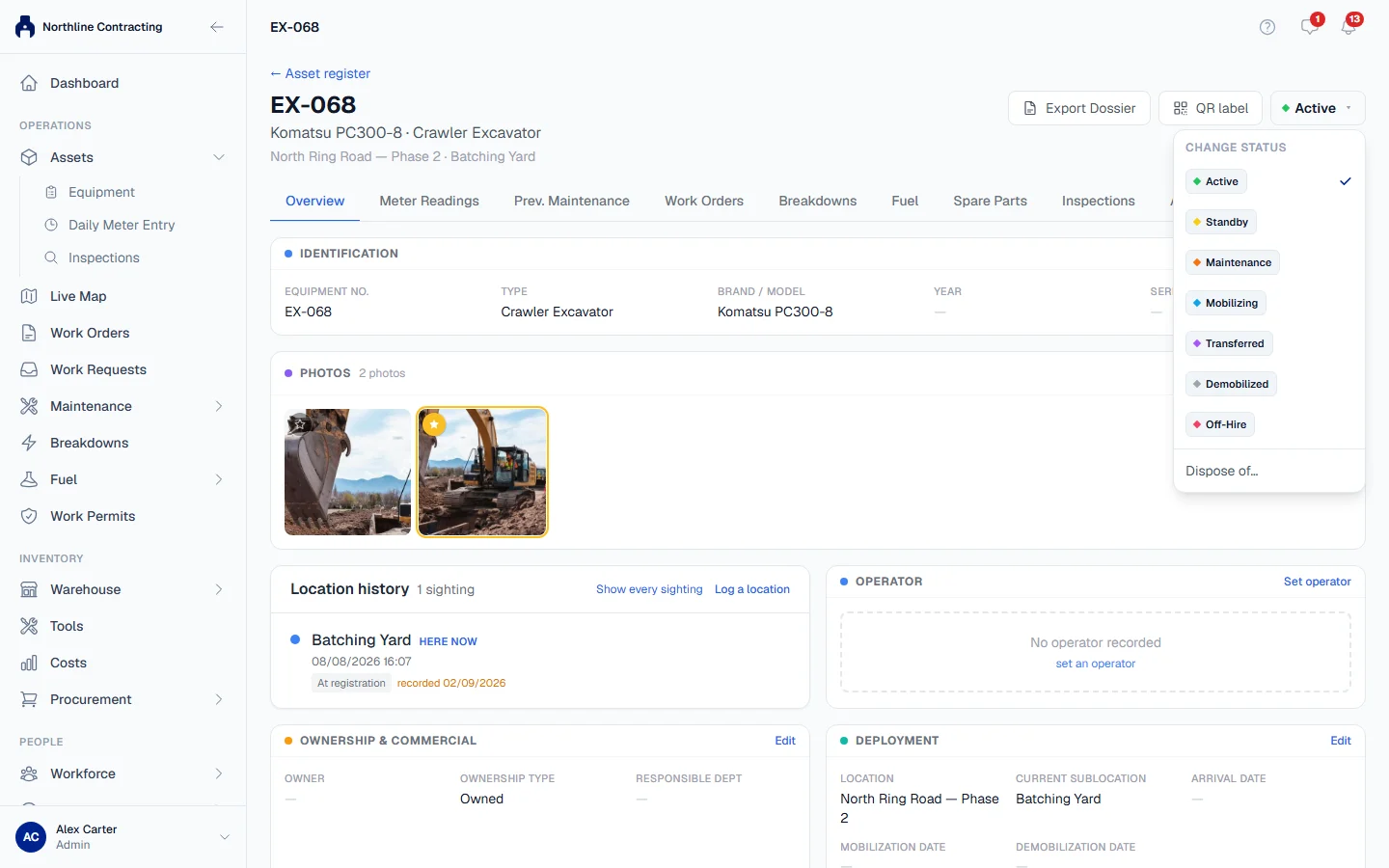
The change is saved straight away and recorded with your name and the time.
Breakdown is automatic
You cannot choose Breakdown from the menu, and you cannot register a machine as broken down. Instead:
- When a breakdown is reported against the machine, its status becomes Breakdown.
- When the breakdown is resolved or cancelled, the machine returns to the status you last chose for it.
While a breakdown is open, the Change status menu says so: "Currently set to Breakdown by an active breakdown. Your choice below applies once it is resolved." You can still choose a status; it takes effect when the breakdown ends.
To put a machine into breakdown, report a breakdown. To take it out, resolve the breakdown, or cancel it if it was logged in error.
Disposed is not a status you pick
A machine that has been sold, scrapped, written off, lost or returned is marked Disposed through Dispose of…, at the bottom of the Change status menu. That asks for a date and a reason, and it is reversed only with Reinstate. See Dispose of a machine and reinstate it.
A disposed machine has no status button: its page shows a banner instead, saying when and why it was disposed of.
Troubleshooting
| What you see | What to do |
|---|---|
| A message saying Breakdown status is derived automatically | Report a breakdown instead of choosing the status. |
| "Use Dispose to mark a machine sold, scrapped or written off." | Use Dispose of… at the bottom of the menu. |
| A message saying the machine is disposed of and must be reinstated | Click Reinstate on the machine's banner, choosing the status it returns to. |
| The status did not change, or an error appears | Your role may not include Equipment: Edit. Ask an administrator. |
| The status stays Breakdown after you choose another | A breakdown is still open. Resolve or cancel it, and your choice applies. |